
Introduction
Business listing sites have become one of the most powerful tools for improving online visibility, especially for local and service-based businesses. These platforms allow companies to publish essential information such as name, address, phone number, website, hours, services, and customer reviews — all in one structured format.
In 2026, search behavior is more local and intent-driven than ever. Customers search for businesses “near me,” compare ratings instantly, and make decisions within minutes. Search engines rely heavily on business listing sites to verify company details, assess credibility, and determine local rankings.
In this guide, you’ll learn:
- What business listing sites are and how they work
- Why they are critical for local SEO and brand visibility
- How to optimize listings for better rankings and conversions
- How to choose the best directories
- A categorized list of 200 powerful business listing sites
- A step-by-step process to register your business
What Are Business Listing Sites?
Definition and Examples
Business listing sites are online directories where businesses create profiles to share important and accurate information about their company. These profiles usually include the business name, address, phone number, website, working hours, services, and customer reviews.
Think of business listing sites as digital versions of the old phone book — but smarter. They don’t just list contact details; they also show ratings, photos, directions, and customer feedback that help people decide quickly.
Some of the most popular business listing sites include:
- Google Business Profile – Helps your business appear in Google Search and Google Maps
- Yelp – Known for customer reviews and ratings
- LinkedIn Company Pages – Important for professional reputation and B2B visibility
There are also many other types of business listing sites, such as:
- Local city-based directories
- Industry-specific platforms (like healthcare or restaurants)
- Global business databases
Each of these platforms helps businesses reach different types of customers.
How Business Listing Sites Help Customers and Search Engines
For customers, business listing sites make it easy to:
- Find contact details quickly
- Read reviews and ratings
- View photos of products or services
- Get directions and opening hours
Instead of visiting many websites, customers can compare businesses directly on business listing sites and make faster decisions.
For search engines, business listing sites act as proof that a business is real and trustworthy. When the same business information appears consistently across many directories, search engines gain confidence in showing that business in local search results.
In simple terms, business listing sites help customers find you and help search engines trust you — which is why they are so important for online visibility.
Why Business Listings Matter
Local SEO Impact and Local Pack Visibility
One of the biggest advantages of using business listing sites is better local search visibility. When your business is listed accurately on multiple trusted business listing sites, search engines gain confidence that your business is real, active, and located where you say it is.
This helps your business appear in important places like:
- Google’s Local Pack (the top map results)
- Google Maps searches
- “Near me” search results
Search engines compare information from different business listing sites to verify your details. If your name, address, and phone number are consistent everywhere, your chances of ranking higher in local results increase. The wider and more accurate your presence across business listing sites, the stronger your local SEO authority becomes.
Citations and Business Credibility
A citation is any mention of your business name, address, and phone number (NAP) online. Business listing sites are the primary source of these citations.
When your business information appears consistently across many business listing sites, it sends strong trust signals to search engines. This consistency helps to:
- Improve search engine trust in your business
- Reduce confusion caused by incorrect or outdated details
- Strengthen your brand’s credibility online
If different business listing sites show different phone numbers or addresses, search engines may not trust the information, which can hurt your rankings.
Direct Traffic, Leads, and Brand Visibility
Business listing sites don’t just help with SEO — they also bring direct customers. Many high-authority business listing sites rank on the first page of Google. Even if your website isn’t ranking at the top, your directory profile still can.
This can lead to:
- More phone calls from interested customers
- More direction requests to your location
- More visits to your website
- More inquiries and leads
Many people make decisions directly from business listing sites without visiting a company’s website. That’s why having complete and optimized profiles on business listing sites can significantly increase your brand visibility and customer engagement.
In simple terms, business listing sites help you rank better, build trust, and attract more customers — making them a key part of any successful local SEO strategy.
Best Practices for Listing Optimization
Optimizing your profiles on business listing sites is just as important as creating them. Well-optimized listings improve your visibility, build trust, and help you rank higher in local search results. Below are the most important best practices to follow.
NAP Consistency
NAP stands for Name, Address, and Phone number. This information must be exactly the same across all business listing sites.
That means:
- Same business name spelling
- Same address format
- Same phone number everywhere
Even small differences — like writing “Street” on one site and “St.” on another — can confuse search engines. When your NAP details are consistent across multiple business listing sites, search engines trust your information more, which helps improve your local SEO rankings.
Keywords and Category Selection
Choosing the right categories is very important when creating profiles on business listing sites. Categories tell search engines and users what your business does.
For example, instead of just choosing “Consultant,” select a more specific option like “Digital Marketing Consultant” if available.
You should also add relevant keywords naturally in your business description on business listing sites. These keywords help your listing appear in searches related to your services, but always keep the language natural and easy to read.
Images and Videos That Build Trust
Profiles with high-quality visuals perform much better on business listing sites. Photos and videos help customers feel confident about your business before they even contact you.
Try to upload:
- Exterior photos so customers recognize your location
- Interior photos to show your workspace
- Team photos to build trust
- Product or service visuals to explain what you offer
Active and visual profiles on business listing sites often get more clicks, calls, and direction requests.
Writing Descriptions That Convert
Your business description on business listing sites should clearly explain:
- What you do
- Who you serve
- Why your business is different
Keep the description simple, clear, and focused on benefits. Avoid long, complicated sentences. A well-written description helps both search engines and customers understand your services quickly.
Reviews and Ratings Strategy
Reviews play a big role in how customers choose businesses on business listing sites. A higher number of positive reviews increases trust and improves click-through rates.
Encourage happy customers to leave reviews on important business listing sites like Google and Yelp. Always respond politely to reviews — both positive and negative. This shows that your business is active and cares about customer feedback.
Update Frequency and Ongoing Maintenance
Your work doesn’t end after creating profiles on business listing sites. Regular updates are important.
Make sure to update:
- Business hours
- Services offered
- Contact details
- Photos
Search engines prefer active and updated profiles on business listing sites, which can help improve your rankings and keep customers informed.
How to Choose the Best Listing Sites
Not all business listing sites offer the same value. Some can significantly improve your visibility and SEO, while others may bring very little benefit. Choosing the right platforms helps you focus your time and effort where it matters most.
Below are the key factors to consider when selecting the best business listing sites for your business.
Domain Authority and SEO Value
One of the first things to check is the overall strength of the website. High-authority business listing sites usually rank well on Google themselves. This means your business profile on these platforms also has a better chance of appearing in search results.
Listings on strong business listing sites help in two main ways:
- They increase your online credibility in the eyes of search engines
- They create trusted citations that support your local SEO efforts
Examples of high-authority business listing sites include Google Business Profile, Yelp, and Bing Places. These platforms send strong trust signals that can improve your local search rankings.
Industry Relevance
Industry-specific business listing sites can be extremely valuable because they attract users who are already interested in your type of service.
For example:
- A doctor should be listed on healthcare directories
- A lawyer benefits from legal directories
- A restaurant should be on food and hospitality directories
These niche business listing sites often bring more qualified leads because visitors are searching for specific services, not just browsing. Search engines also view industry-relevant listings as a sign that your business truly belongs in that category.
Do-Follow Link Opportunities
Some business listing sites provide backlinks to your website. A backlink is a link from another site to yours, and it plays an important role in SEO.
There are two types of links:
- Do-follow links pass SEO value and help improve your website’s authority
- No-follow links may not pass strong SEO value but still bring traffic and visibility
When a trusted business listing site offers a do-follow link, it can strengthen your website’s ranking potential. Even no-follow links are useful because they drive real visitors and increase brand exposure.
Local Relevance
If your business serves a specific city or region, local business listing sites are extremely important. These platforms focus on businesses in a particular area, which helps search engines understand where your business operates.
Local and regional business listing sites help:
- Improve rankings for “near me” searches
- Strengthen your presence in Google Maps results
- Increase visibility among local customersBeing listed in city or regional directories helps search engines understand where your business is located and improves your visibility in local search results.
Free vs. Paid Listings
Many business listing sites offer free profiles, while others charge for premium features. Knowing where to spend helps you get the best return.
Free business listing sites are great for:
- Building citations
- Improving local SEO
- Increasing basic online visibility
They help search engines verify your business details and strengthen trust.
Paid business listing sites may offer:
- Featured placement in search results
- Do-follow backlinks
- Extra branding (photos, videos, offers, CTAs)
Only invest in paid options if the business listing sites have strong traffic, real users, and clear marketing benefits.
Smart Approach
Start with high-authority free business listing sites, then upgrade only on platforms that can bring real leads, visibility, and SEO value.
Final Tip
The best strategy is to use a mix of:
- High-authority global business listing sites
- Industry-specific directories
- Local and regional business listing sites
This balanced approach builds strong SEO signals, improves visibility, and helps attract both search engines and real customers.
Comprehensive List of Business Listing Sites
Below is a categorized list of 200 business listing sites to help you build strong citations and visibility.
| S.NO. | Business Listing Site | Website Link | Domain Authority (DA) |
| 1. | Rankfirms | https://www.rankfirms.com/ | 17 |
| 2. | Yalwa | https://www.yalwa.com/ | 33 |
| 3. | BizCommunity | https://www.bizcommunity.com/ | 75 |
| 4. | 9Sites | https://www.9sites.net/ | 29 |
| 5. | TSection | https://www.tsection.com/ | 29 |
| 6. | Viesearch | https://www.viesearch.com/ | 48 |
| 7. | ABC Directory | https://www.abc-directory.com/ | 37 |
| 8. | SoMuch | https://www.somuch.com/ | 35 |
| 9. | Justdial | https://www.justdial.co | 71 |
| 10. | IndiaMART | https://www.indiamart.com/ | 77 |
| 11. | Quora Business | https://quora.com/business | 93 |
| 12. | Booking.com | https://booking.com/ | 94 |
| 13. | Yellow Pages | https://yellowpages.com/ | 88 |
| 14. | OscarEarn | https://oscarearn.com/ | 20 |
| 15. | TusBaazar | https://tusbaazar.com/ | 23 |
| 16. | TradeB2B | https://www.tradeb2b.net/ | 18 |
| 17. | SubmitMyBusiness | https://www.submitmybusiness.com/ | 13 |
| 18. | NearbyShops | https://nearbyshops.in/ | 11 |
| 19. | PaperDoor | https://paperdoor.in/ | 19 |
| 20. | ReviewCentre | https://www.reviewcentre.com/ | 69 |
| 21. | Google Business Profile | https://www.google.com/business | 100 |
| 22. | Foursquare | https://foursquare.com/ | 92 |
| 23. | FindUsLocal | https://www.finduslocal.com/ | 45 |
| 24. | MerchantCircle | https://www.merchantcircle.com/ | 76 |
| 25. | AboutUs | https://aboutus.com/ | 61 |
| 26. | Bing Places | https://www.bingplaces.com/ | 51 |
| 27. | Prsync | https://prsync.com/ | 66 |
| 28. | LocalFrog.in | https://www.localfrog.in/ | 13 |
| 29. | PaperDoor.in | https://paperdoor.in/ | 19 |
| 30. | BusinessFinder.in | https://www.businessfinder.in/ | 15 |
| 31. | Elib.org | https://elib.org/ | 50 |
| 32. | Fyple | https://www.fyple.com/ | 41 |
| 33. | Storeboard | https://www.storeboard.com/ | 61 |
| 34. | DesignFirms.org | https://designfirms.org/ | 52 |
| 35, | Bizhwy | https://bizhwy.com/ | 39 |
| 36. | Place123 | http://place123.net/ | 43 |
| 37. | Webwiki | https://webwiki.com/ | 75 |
| 38. | CityFos | https://cityfos.com/ | 43 |
| 39. | Biznet US Directory | https://de.biznet-us.com/ | 36 |
| 40. | GetFreeListing | https://getfreelisting.com/ | 32 |
| 41. | Gust | https://gust.com/ | 74 |
| 42. | Owler | https://owler.com/ | 66 |
| 43. | IndiaCom | https://indiacom.com/ | 54 |
| 44. | WhereInCity | https://whereincity.com/ | 53 |
| 45. | Foodpanda.in | https://foodpanda.in/ | 50 |
| 46. | SoMuch | https://www.somuch.com/ | 78 |
| 47. | Bing Places | https://www.bingplaces.com/ | 51 |
| 48. | CitySquares | https://citysquares.com/ | 67 |
| 49. | LinkedIn Company Directory | https://www.linkedin.com/ | 98 |
| 50. | Nextdoor | https://nextdoor.com/ | 76 |
| 51. | Better Business Bureau (BBB) | https://www.bbb.org/ | 95 |
| 52. | Apple Maps Connect | https://mapsconnect.apple.com/ | 95 |
| 53. | Find-us-here | https://find-us-here.com/ | 60 |
| 54. | Local.com Claim | https://local.com/claim-your-listing | 59 |
| 55. | Zomato Business Page | https://zomato.com/ | 83 |
| 56. | City-data | https://city-data.com/ | 82 |
| 57. | USA Business Directory | https://usa.businessdirectory.cc/ | 21 |
| 58. | Biznet-US | https://de.biznet-us.com/ | 36 |
| 59. | Cybo | https://www.cybo.com/ | 51 |
| 60. | BusinessRater | https://businessrater.com/ | 91 |
| 61. | huntbiz.com | http://www.huntbiz.com/ | 11 |
| 62. | citytadka.com | http://www.citytadka.com/ | 14 |
| 63. | businessfinder.in | http://www.businessfinder.in/ | 15 |
| 64. | sholay.in | https://sholay.in/ | 24 |
| 65. | localstar.org | http://www.localstar.org/ | 26 |
| 66. | indiabizlist.com | http://www.indiabizlist.com/ | 25 |
| 67. | poweredindia.com | http://www.poweredindia.com/ | 22 |
| 68. | aaspass.com | https://aaspass.com/ | 18 |
| 69. | vanik.com | https://www.vanik.com/ | 18 |
| 70. | indiabusinessenquiry.com | http://www.indiabusinessenquiry.com/ | 12 |
| 71. | bharathlisting.com | https://bharathlisting.com/ | 17 |
| 72. | rajb2b.com | http://www.rajb2b.com/ | 20 |
| 73. | LinkCentre | https://linkcentre.com/ | 41 |
| 74. | CityFos | https://www.cityfos.com/ | 43 |
| 75. | Here.com | https://here.com/ | 88 |
| 76. | Manta | https://manta.com/ | 88 |
| 77. | MapQuest | https://mapquest.com/ | 92 |
| 78. | Sulekha | https://sulekha.com/ | 77 |
| 79. | Angel.co | https://angel.co/ | 85 |
| 80. | MaharashtraDirectory | https://maharashtradirectory.com/ | 64 |
| 81. | BusinessWorld.in | https://businessworld.in/ | 64 |
| 82. | BusinessFinder.in | https://www.businessfinder.in/ | 15 |
| 83. | Justlanded | https://www.justlanded.com/ | 76 |
| 84. | GujaratDirectory | http://www.gujaratdirectory.com/ | 22 |
| 85. | YaSabe | https://www.yasabe.com/ | 39 |
| 86. | ReviewCentre | https://www.reviewcentre.com/ | 66 |
| 87. | PoweredIndia | http://www.poweredindia.com/ | 22 |
| 88. | IgotBiz | https://www.igotbiz.com/ | 21 |
| 89. | Akama | https://akama.com/ | 36 |
| 90. | FindinAll | http://www.findinall.com/ | 22 |
| 91. | Dubai Business Directory | https://dubaibusinessdirectory.com/ | 58 |
| 92. | Asia-Net Directory | https://asia-net.org/ | 65 |
| 93. | Blogarama | https://blogarama.com | 78 |
| 94. | MouthShut | https://mouthshut.com/ | 68 |
| 95. | YelloYello | https://yelloyello.com/ | 68 |
| 96. | Bing Places | https://www.bingplaces.com/ | 51 |
| 97. | eLocal | https://www.elocal.com/ | 65 |
| 98. | Cybo | https://www.cybo.com/ | 51 |
| 99. | TrepUp | https://trepup.com/ | 57 |
| 100. | WhereInCity | https://whereincity.com/ | 53 |
Step-by-Step Guide: How to Register Your Business on Business Listing Sites
Getting your company listed on Business listing sites is one of the easiest and most powerful ways to improve your online visibility. These platforms help customers discover your business, build trust, and strengthen your local SEO rankings. If done correctly, listings can drive more calls, website visits, and foot traffic.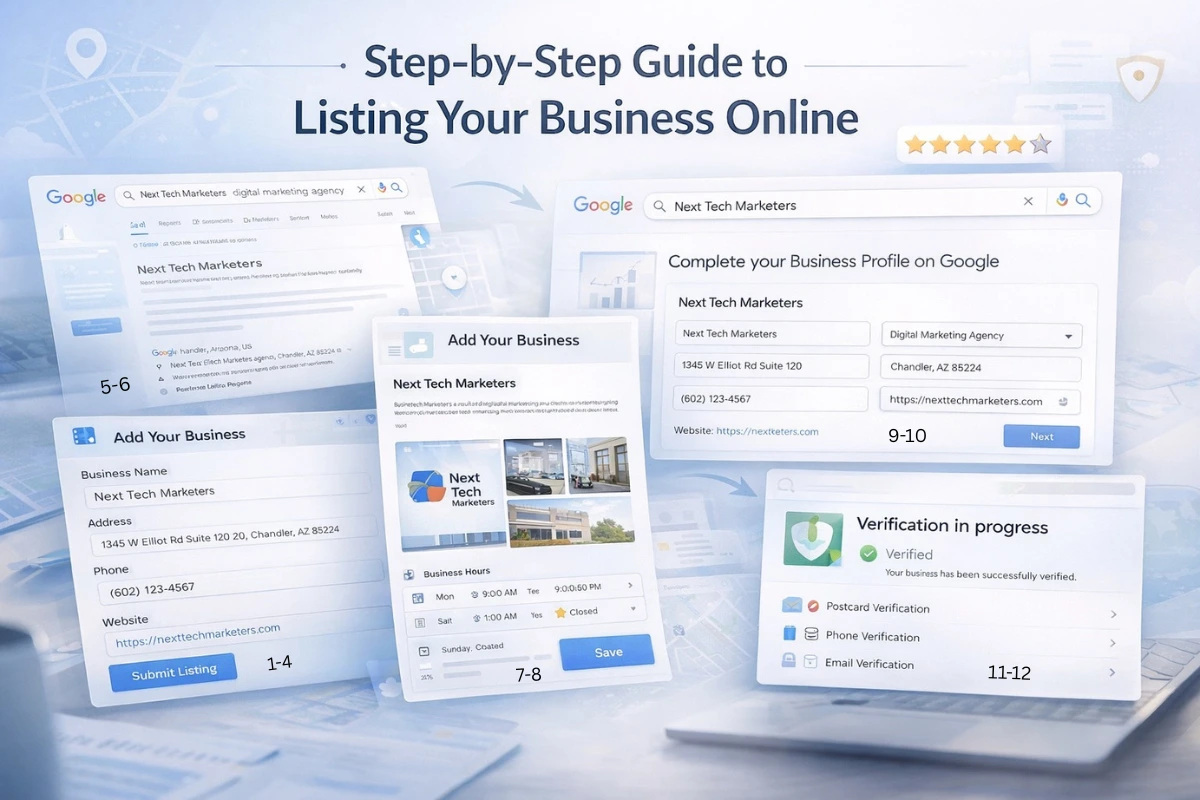
Follow this step-by-step guide to register your business the right way.
Step 1: Gather Your Business Information
Before creating profiles on Business listing sites, prepare all your business details in one place. This ensures accuracy and consistency across every platform.
You should have:
- Official Business Name
- Complete Address
- Phone Number
- Website URL
- Business Category
- Short and Long Description
- Business Hours
- Logo and Photos
- Service Areas (if you serve multiple locations)
Consistency in NAP (Name, Address, Phone number) across all Business listing sites is crucial for local SEO.
Step 2: Create a Professional Business Email
Use a dedicated business email such as info@yourbusiness.com when signing up on Business listing sites. This keeps your listings secure, professional, and easy to manage in the future.
Step 3: Choose the Right Business Listing Sites
Not all directories provide equal value. Start with high-authority Business listing sites that offer strong SEO benefits and customer reach.
Top platforms include:
- Google Business Profile
- Bing Places
- Yelp
- Facebook Business
- Justdial (for Indian businesses)
These Business listing sites have high trust and often appear in search results.
Step 4: Sign Up or Claim Your Business
When you visit Business listing sites, you’ll find one of two situations:
Your business is not listed
→ Select “Add Business” or “Sign Up”
Your business already exists
→ Click “Claim this Business”
Claiming your listing gives you full control to edit details, respond to reviews, and improve your visibility.
Step 5: Enter Accurate Business Details
Fill out every field carefully. Business listing sites use this information to rank and display your profile.
Important fields include:
- Business Name
- Address (must match everywhere)
- Phone Number
- Website
- Primary Category
Selecting the correct category helps Business listing sites show your business to the right audience.
Step 6: Write an SEO-Friendly Business Description
Your description should clearly explain:
- What your business does
- Your main services or products
- Your location
- What makes you unique
Use natural keywords related to your services. A well-written description helps both customers and Business listing sites understand your offerings.
Step 7: Upload High-Quality Photos and Videos
Profiles with images get significantly more engagement on Business listing sites. Visuals build trust and encourage customers to choose your business.
Upload:
- Company Logo
- Exterior photos
- Interior workspace
- Team photos
- Product or service images
Authentic photos improve credibility and clicks.
Step 8: Add Accurate Business Hours
Incorrect hours can lead to customer frustration and negative reviews. Make sure Business listing sites show:
- Weekday hours
- Weekend hours
- Holiday updates
Accurate information increases trust and improves customer experience.
Step 9: Add Service Areas
If your business serves customers at their location, include service areas such as cities, regions, or PIN codes. Business listing sites use this data to show your business in nearby searches.
Step 10: Verify Your Business
Verification proves your business is legitimate. Most Business listing sites require this step before your profile becomes fully visible.
Common verification methods:
- Postcard with code
- Phone call
- Video verification (sometimes required by Google)
Verified listings often rank higher on Business listing sites.
Step 11: Double-Check Before Publishing
Before submitting, review all details:
- Correct business name spelling
- Accurate address
- Working phone number
- Right category
- Functional website link
Errors can reduce your performance on Business listing sites and confuse customers.
Step 12: Keep Your Listings Updated
Creating listings is not a one-time task. Active profiles perform better on Business listing sites.
Regularly:
- Add new photos
- Update hours during holidays
- Respond to customer reviews
- Add new services or offers
Fresh and updated profiles signal trust and relevance.
Common Mistakes to Avoid on Business Listing Sites
Avoid these errors that can harm your local SEO:
- Different phone numbers on different Business listing sites
- Creating duplicate listings
- Choosing incorrect categories
- Leaving descriptions blank
- Not adding photos
These mistakes reduce visibility and credibility.
Pro Tip for Better Results
Instead of listing your business everywhere at once, start with 10–15 top Business listing sites. Make those profiles perfect and consistent before expanding to more directories. Quality and accuracy always outperform quantity.
FAQs
- How long does it take for my business to appear on business listing sites?
It can take anywhere from a few hours to a few weeks depending on the platform. Verification delays and profile completeness often affect how quickly business listing sites publish your listing. - Do business listing sites really help with local SEO?
Yes, business listing sites improve your local SEO by increasing online visibility, building backlinks, and sending trust signals to search engines through consistent business information. - Can I list my business on multiple business listing sites?
Absolutely. Listing your business on multiple business listing sites increases your reach, but it’s important to keep your Name, Address, and Phone number (NAP) consistent everywhere. - What should I do if my business details change?
You should immediately update your information across all business listing sites to avoid confusing customers and hurting your search rankings. - Are free business listing sites enough, or should I pay for premium listings?
Free listings on major business listing sites are often enough for visibility, but premium options can provide added features like better placement, ads, or enhanced profiles depending on your goals.
Conclusion & Next Steps
Conclusion
In 2026, Business listing sites are a core pillar of digital visibility, local SEO, and customer trust. When your business information is accurate, consistent, and optimized across trusted directories, search engines rank you higher and customers choose you faster. Strong listings don’t just improve rankings — they drive real calls, visits, and leads.
Next Step
Start by claiming and fully optimizing your profiles on top Business listing sites like Google Business Profile, Facebook, Yelp, and Bing Places. Ensure NAP consistency, add compelling descriptions and photos, collect reviews, and then gradually expand to niche and local directories to strengthen your authority and reach.
Action Plan
- Start with top platforms (Google, Facebook, Yelp)
- Ensure NAP consistency
- Add photos and descriptions
- Encourage reviews
- Expand to niche and local business listing sites
Consistent effort across business listing sites will steadily improve search rankings, trust, and customer inquiries.